



Reprogramming Your Thermostat for the Back-to-School Schedule Without Spiking Energy Bills
Transitioning Your Cooling Strategy for the Empty House
The late-summer back-to-school transition is officially here, which means it is time to start Reprogramming Your Thermostat for the Back-to-School Schedule Without Spiking Energy Bills. August brings a sudden and dramatic shift to your household routine. Just last week, the house was fully occupied all day long. Kids were running in and out, exterior doors were constantly opening, and your cooling system was working overtime to maintain a steady temperature against the summer heat. Now, the house sits completely empty for eight hours a day during the absolute hottest part of the afternoon.
Here at Compass Heating & Cooling, our technicians frequently see homeowners leave their thermostat on its constant summer schedule out of habit. Running your system at 70 degrees while no one is home wastes a tremendous amount of energy and puts unnecessary wear on your equipment. On the flip side, shutting the system off entirely or setting the temperature far too high causes the equipment to struggle endlessly to recover when everyone returns. The goal is to establish a balanced daily schedule that maintains system efficiency without sacrificing your family's comfort when they finally drop their backpacks by the door.
Before diving into the exact temperature settings, we always advise ensuring your Air Conditioning system is prepared for the daily workload by scheduling professional AC maintenance. A system that is low on refrigerant or struggling with a clogged filter will fail to execute even the smartest thermostat schedule.
The Physics of an Empty House During Peak Heat
To understand why a new schedule is necessary, you have to look at the mechanics of heat gain inside your home. During the back-to-school season, houses typically sit unoccupied from roughly 7:30 AM to 3:30 PM. This eight-hour block aligns perfectly with the timeframe when outdoor temperatures climb to their absolute highest peak.
Solar heat gain plays a massive role in Northern Colorado. In our experience, the intense high-altitude sun bakes the exterior of your home, radiating heat through the roof, penetrating the windows, and warming the exterior walls. If your cooling system is fighting this intense heat while the house is empty, you are paying to cool furniture rather than people. The Department of Energy recommends a 7-10 degree setback for this exact eight-hour window to maximize energy efficiency.
Thermal mass is another crucial factor. Your home is not just filled with air; it is filled with drywall, hardwood floors, couches, and cabinetry. These physical objects absorb and hold onto heat. When your system runs, it is not just cooling the air—it has to cool all of that thermal mass. Understanding this helps explain why extreme temperature swings are counterproductive.
Why the Summer Routine Fails in August
The constant door-opening chaos of summer break requires a steady, unyielding thermostat setting to keep up with the loss of conditioned air. However, a school day presents a sealed, unoccupied environment. Maintaining a rigid 70-degree setting in an empty house forces your compressor to cycle on and off continuously during the hottest, least efficient part of the day in Loveland, CO. Our team has replaced far too many prematurely worn compressors because they were fighting the sun at its strongest point, with zero benefit to your family's comfort.
Morning Strategies: Wake and Leave Settings
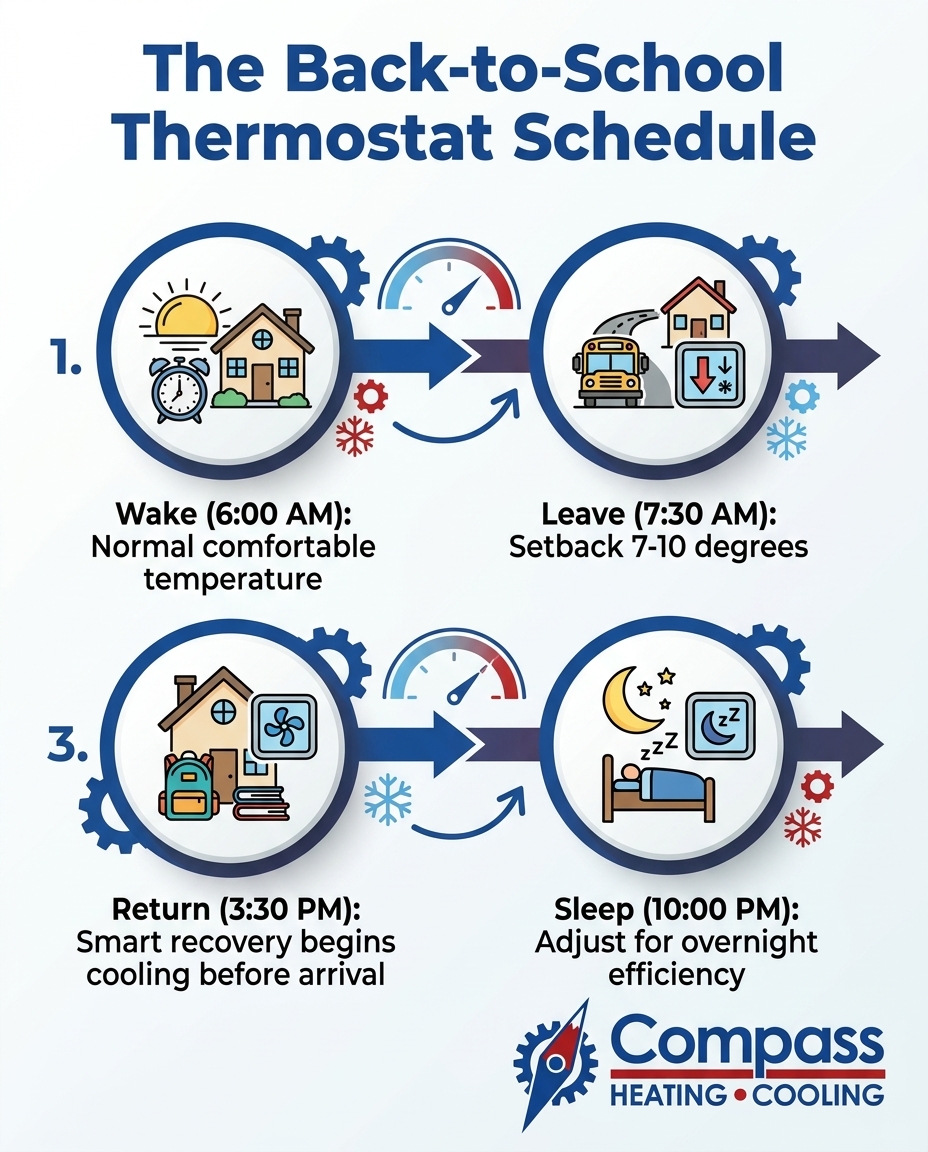
Creating an efficient daily schedule requires breaking your day into four distinct blocks: Wake, Leave, Return, and Sleep. The first two blocks set the tone for your home's energy consumption for the rest of the day.
Setting the Morning Baseline
The "Wake" period covers the chaotic morning rush while your family gets ready for school and work. The "Leave" period dictates the exact moment your system scales back its efforts. Follow these steps to optimize your morning routine during the late-summer back-to-school transition:
1. Establish the Wake time: Set the thermostat to your preferred comfortable temperature (usually between 70 and 74 degrees) about 15 to 30 minutes before the first person gets out of bed. This ensures the house is comfortable while everyone is showering and eating breakfast.
2. Avoid morning overcooling: Do not drop the temperature to 65 degrees in an attempt to "store" cold air for the afternoon. Houses naturally leak energy, and that stored cold air will dissipate long before the peak afternoon heat arrives, wasting energy in the process.
3. Time the Leave setting correctly: Program the 7-10 degree setback to begin about 15 to 20 minutes before the last person typically walks out the door. The house will retain its comfortable temperature long enough for the final departure.
4. Lock in the setback: Allow the thermostat to rise to 78 or 80 degrees. This reduces the temperature differential between the indoors and outdoors, significantly slowing the rate of heat gain.
Preparing your equipment for these daily shifts is just as important as the settings themselves. Reviewing seasonal HVAC maintenance tips ensures your blower motor and compressor are ready to handle the transition from a relaxed morning baseline to a warmer afternoon setback.
The 3:30 PM School Return: Mastering Smart Recovery
The most challenging time for any cooling system is the "Return" period. Right around 3:30 PM, the kids are getting off the bus, the doors are opening, and the house needs to be comfortable. However, this is also the exact moment when the outdoor heat is at its absolute peak.
If you wait until you walk through the door to lower the thermostat from 80 degrees back down to 72 degrees, your system will struggle. It has to fight peak afternoon heat while simultaneously extracting eight hours of accumulated heat from the home's thermal mass. This forces the compressor to run continuously for hours, which drastically increases wear and tear.
In our years of repairing and maintaining HVAC systems across Northern Colorado, our team at Compass Heating & Cooling has seen firsthand how these specific Front Range temperature swings impact equipment recovery times. Loveland's late-summer highs regularly hit the mid-80s to low-90s, meaning we always recommend giving your equipment a realistic head start to recover before the kids drop their bags.
Programmable vs. Smart Thermostats
How you handle the 3:30 PM return depends entirely on the type of thermostat mounted on your wall.
• Traditional Programmable Thermostats: These devices follow rigid time commands. If you want the house at 72 degrees by 3:30 PM, you must program the "Return" block to start cooling at 2:30 PM. You have to manually guess how long the system needs to recover based on the outdoor weather.
• Smart Thermostats: These modern devices feature "smart recovery" algorithms. You simply tell the thermostat you want the house at 72 degrees at 3:30 PM. The device monitors the outdoor weather, learns your home's unique thermal profile, and automatically calculates the exact moment it needs to turn on to hit that target temperature perfectly on time.
If your system consistently fails to reach the target temperature by the time your family returns, even with a proper head start, it may be struggling mechanically. This is a clear indicator that you need professional AC repair in Loveland to address underlying airflow or refrigerant issues.
Evening and Sleep: Leveraging the Front Range Cooldown
Once the sun finally dips below the horizon, the cooling load on your home changes dramatically. The "Sleep" period is your opportunity to leverage the natural climate advantages of Loveland, CO, to give your equipment a much-needed break.
The Front Range is known for rapid evening temperature drops. As the outdoor temperature falls, the heat transfer reversing—meaning heat naturally wants to escape your home rather than push its way in. This rapid evening cooling naturally relieves the workload on your compressor.
Optimizing Overnight Comfort
The Department of Energy suggests raising your thermostat setting slightly while sleeping. Because your body core temperature drops during sleep, a room kept at 74 or 75 degrees often feels perfectly comfortable, especially if you utilize ceiling fans.
The wind-chill effect: Ceiling fans do not lower the air temperature in a room; they cool the people in the room by creating a wind-chill effect on your skin. Running a ceiling fan in occupied bedrooms allows you to raise the overnight thermostat setting by up to four degrees without anyone feeling a difference in comfort. Just remember to turn the fans off when you leave the room in the morning.
Establishing this consistent, four-block daily schedule drastically reduces the overall wear and tear on your moving parts. However, even the most optimized schedule cannot replace proactive mechanical care. Enrolling in a routine maintenance plan ensures your blower motor, evaporator coil, and electrical contacts remain clean and calibrated to handle these daily transitions year after year.
The Myth of Turning the AC Completely Off
When talking with customers in Loveland, one of the most common misconceptions our team hears during the late-summer back-to-school transition is the belief that turning the system completely off from 8:00 AM to 3:00 PM saves the most energy. While it seems logical that zero runtime equals zero energy usage, the physics of heat transfer prove otherwise.
The Problem: When you turn the system completely off, the indoor temperature and humidity levels rise unchecked for eight hours. The air becomes stagnant, and the home's thermal mass absorbs massive amounts of heat energy.
The Cause: By 3:30 PM, your home might reach 85 degrees or higher. When you finally turn the system back on, it faces an insurmountable workload. It must first remove gallons of latent moisture (humidity) from the air before it can even begin to lower the sensible temperature. The compressor is forced to run at maximum capacity for three to four consecutive hours.
The Solution: A 7-10 degree setback is the proven sweet spot for efficiency and equipment safety. It prevents the house from becoming a heat sink while still reducing energy consumption.
• Turning System Completely Off — Impact on Equipment: Severe strain. Compressor runs continuously for hours upon return to remove deep heat and humidity. — Indoor Comfort Level: Poor. House remains hot and sticky for hours after everyone gets home. — Energy Efficiency: Low. The massive energy surge required to recover negates the daytime savings.
• 7-10 Degree Setback (e.g., 78°F) — Impact on Equipment: Minimal strain. System cycles occasionally to prevent extreme heat buildup. — Indoor Comfort Level: Excellent. Smart recovery easily brings the house back to a comfortable 72°F by 3:30 PM. — Energy Efficiency: High. Reduces daytime cooling load without requiring a massive power surge later.
Furthermore, extreme indoor temperatures can warp hardwood floors, damage sensitive electronics, and cause drywall to expand and contract unnaturally. Keeping the house within a reasonable temperature range protects your property investment just as much as it protects your utility bill.
Simplify Your Fall Routine: Reprogramming Your Thermostat for the Back-to-School Schedule Without Spiking Energy Bills
Adjusting to the back-to-school transition does not have to mean sacrificing your family's comfort or facing shockingly high utility statements at the end of the month. By implementing a strategic Wake, Leave, Return, and Sleep schedule, you prevent your equipment from pointlessly cooling an empty house.
The key is finding that perfect balance—allowing the house to warm up just enough to save energy, but keeping it cool enough that your system can easily recover before the afternoon school bus arrives. A straightforward, daily thermostat schedule prevents cooling an empty house while ensuring comfort when the family gets home. If you want to guarantee your equipment is ready to handle this new daily routine with maximum efficiency, reach out to schedule a professional tune-up today.
Frequently Asked Questions
What is the best temperature for an empty house in summer?
The Department of Energy recommends setting your thermostat 7 to 10 degrees higher than your normal comfort setting when the house is empty. For most homes, this means setting the thermostat between 78 and 80 degrees while everyone is at work or school. This specific range reduces the cooling load on your equipment without letting the house get so hot that it becomes difficult to cool back down later.
How to program a thermostat for a school schedule?
Divide your day into four blocks: Wake, Leave, Return, and Sleep. Program the "Leave" setting to raise the temperature 15 minutes before the last person leaves the house. Set the "Return" setting to begin lowering the temperature about an hour before the kids get off the bus, ensuring the house is comfortable the moment they walk through the door.
Should I turn off my AC while at work?
No, you should never turn your system completely off while you are away for the day. Turning it off allows heat and humidity to soak into your furniture, walls, and flooring. When you turn the system back on, it has to work twice as hard and run for hours to remove that deep, trapped heat, which cancels out any energy you saved earlier in the day.
Does a 10-degree setback actually save energy?
Yes, a 10-degree setback is highly effective for saving energy during an eight-hour workday. By allowing the indoor temperature to rise closer to the outdoor temperature, you slow down the rate at which heat enters your home. This significantly reduces the number of times your compressor has to cycle on during the hottest part of the afternoon.
How long does it take for an AC to recover from a daytime setback?
Based on the cooling systems we install and service throughout Loveland, a properly sized and well-maintained system typically needs about 45 to 60 minutes to recover from a 7-10 degree daytime setback. However, recovery times can vary based on the intensity of the outdoor heat, the quality of your home's insulation, and whether you are using a smart thermostat with automatic recovery features to ease the system back to your target temperature.
hear what our satisfied clients have to say
Our clients consistently praise our exceptional service and attention to detail. They appreciate the personalized approach we take to meet their unique needs, ensuring satisfaction every step of the way.
.png)